The ownership system for multi-asset homeowners

Everything you own. Ready when you need it.

MyOwnerOS keeps your home, vehicles, equipment, and other important assets connected to their receipts, warranties, manuals, maintenance, costs, and history—so you know what needs attention and what comes next.

7-day Plus preview · No credit card required

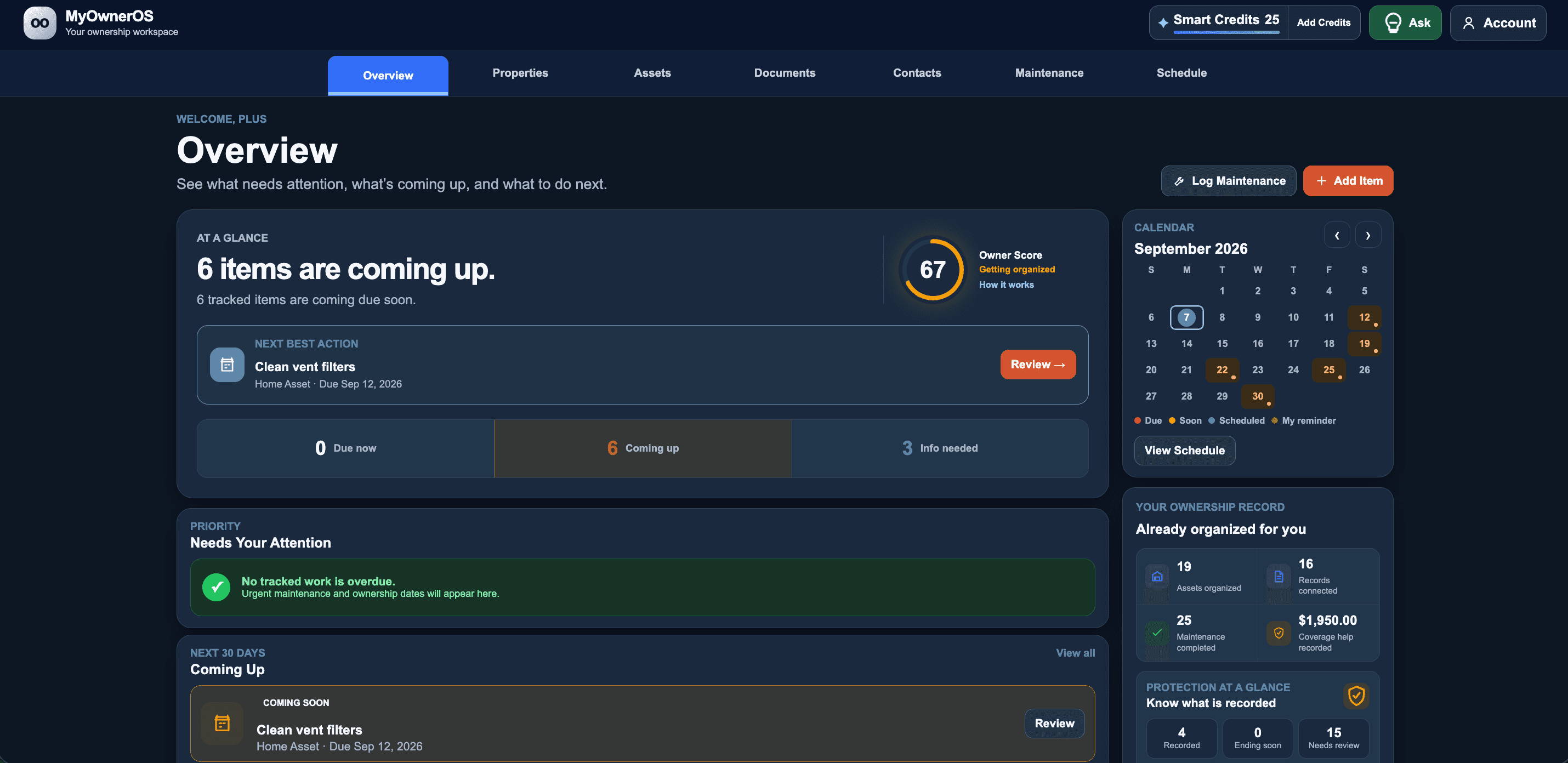
MyOwnerOS Overview with an Owner Score, upcoming work, calendar, and recorded savings
Private files
AI only when you start it
You approve every change
Import preview with undo

2-minute readiness check

How ready is the ownership record behind what you own?

Answer 10 quick questions and get a personalized readiness profile, practical first step, and MyOwnerOS plan recommendation.

Check my readiness 10 questions · About 2 minutes · No email required
Your answers stay in this browser session. They are not saved to an account or sent with analytics.

See the complete ownership story

Every record stays with the asset it belongs to.

Open one item and see its files, maintenance, protection, contacts, costs, and history together.

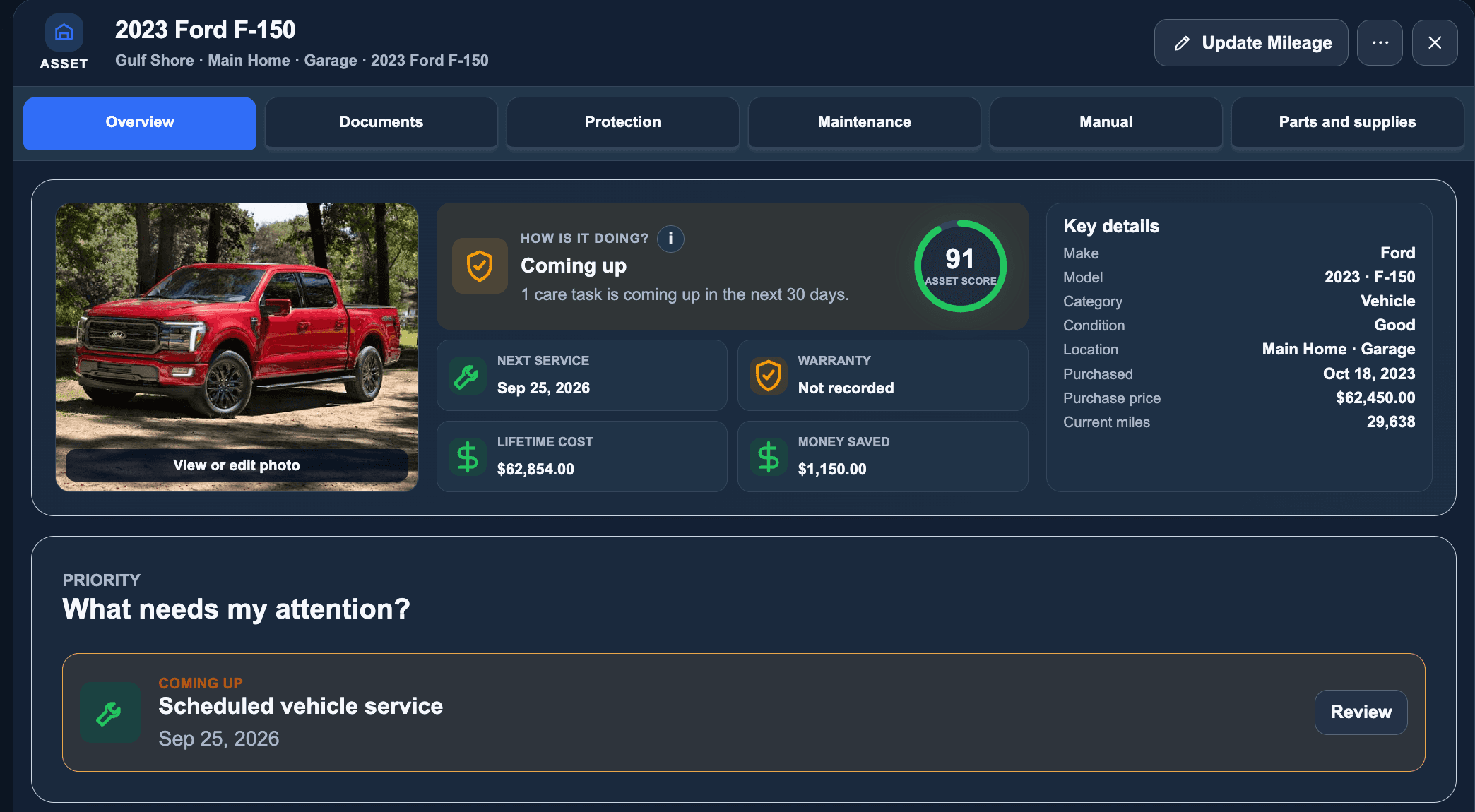
Everything stays with the asset

See the complete story behind one asset.

Files, maintenance, contacts, warranties, insurance, costs, mileage, and ownership history stay connected to the item they belong to.
Complete Ford F-150 asset record with condition, service, warranty, costs, savings, and key details

Simple by design

Set up one item in minutes. Not another weekend project.

Start with the asset that matters most. Build the rest only when it is useful.

  1. 01
    Add one itemHow would you like to start?
    Scan a labelUpload a receiptEnter it yourself

    Take a photo or add what you have

    Scan a product label, receipt, warranty, manual, or maintenance record—or enter the item yourself.

  2. 02
    Draft ready for review
    EditApprove details

    Review before anything is saved

    MyOwnerOS drafts the useful details. You confirm or edit every suggestion.

  3. 03
    Ownership history

    Filter replacedAug 18 · Completed

    Next reminder scheduledNov 18 · 9:00 AM

    Let the record keep working

    Get reminders, preserve completed history, and find the proof without searching through folders and inboxes.

Know what matters today

Know what needs attention before it becomes a problem.

MyOwnerOS separates what is due now, what is coming soon, and what information is still missing—without forcing you to maintain another list.

Due now2Replace HVAC filter
Coming soon4Generator inspection
Details needed1Add purchase date

Keep the proof

Keep the proof ready before you need it.

Receipts, warranties, insurance, manuals, service history, and ownership details stay with the right asset when something breaks, expires, is sold, or requires proof.

Protection record

Downstairs HVAC

Limited warrantyCoverage details saved
Purchase receiptProof connected to this asset
Service history6 completed records

Understand the cost

Know what ownership is actually costing you.

See purchase values, maintenance spending, covered repairs, and recorded savings using the information you have already saved.

Purchase$38,400
Maintenance$3,240
Protection saved$1,600

Built for real ownership

One ownership system for more than the house.

Home systems
Appliances
Vehicles
Boats and engines
Equipment and tools
Multiple properties

Simple plans

Start with the level of help you need.

Try Plus free for 7 days. No credit card required.

Best for most owners

MyOwnerOS Plus

$99.99/year

About $8.33/month when billed annuallyOr $14.99 month-to-month
  • Smart Intake
  • Home, vehicles, equipment, and other assets
  • Maintenance guidance and reminders
  • Cost Intelligence and advanced ownership records
Start free with Plus

MyOwnerOS Pro

$179.99/year

About $15/month when billed annuallyOr $19.99 month-to-monthMultiple properties and larger personal portfolios
  • Everything in Plus
  • Multiple properties
  • Larger ownership portfolios
  • Advanced organization and reporting
Choose Pro

Prefer manual organization only? MyOwnerOS Essentials is $59.99/year, or $7.99 month-to-month.

Smart features included

Plus and Pro include a recurring Smart Credit allowance for AI-assisted document reading, manual questions, Smart Intake, and other Smart features. Need more? Add Smart Credit packs anytime.

How Smart Credits work

Fair and predictable

Billing and Smart Credits, in plain English.

Your records stay yours. Smart costs appear before processing.

What is the difference between Essentials, Plus, and Pro?

Essentials lets you enter items, save files, and track dates and care yourself. Plus adds Smart tools, care guidance from the maker, maintenance emails, cost tracking, and more reports. Pro adds more properties, room for more items, and the most included Smart Credits. Check Plan & Billing for the features available to you.

What happens to my records if I downgrade?

Your saved items, homes, files, care history, costs, contacts, and reminders are kept. Once the lower plan starts, you can no longer use tools that require the higher plan.

When does a downgrade take effect?

A lower plan starts when your current paid period ends. You keep your current plan until then. When plan changes are available, you will see the new plan and its start date before you agree.

What are Smart Credits?

Smart Credits pay for AI tools, such as reading a receipt, Smart Intake, or an AI explanation. You see the credit cost before you choose to start. Searching saved records and help guides does not use credits.

Which actions use Smart Credits?

AI tools can use credits to read labels, receipts, warranties, policies, or care records. AI manual answers and full-manual analysis can also use credits when available. Each action shows its cost before you start it.

What happens if an AI action fails?

The needed credits are held while the tool works. They are used when a useful result is saved. If the action fails and the hold is released, usage history can show No charge. Contact support if a charge looks wrong.

What happens to purchased Smart Credits if I downgrade?

Your purchased credits stay if you move to a lower paid plan. Included credits are used first, then purchased credits. Credits do not unlock tools that your plan does not include.

What happens if I cancel MyOwnerOS completely?

Read the final notice before canceling and download the records you need. The current policy plans to keep files recoverable for 30 days, subject to that notice and the law. Contact support about any refund for purchased credits. The Refunds & Cancellation policy applies.

Private by design

Private by design. You decide what gets read, saved, and shared.

Your files stay private. MyOwnerOS does not run AI simply because you uploaded something. You start each Smart Intake action, review the draft, and approve what becomes part of your record.

Private account-scoped files
AI only when the owner initiates it
Review required before changes are saved
Imports can be previewed and undone

Built from a real problem

When life happens, scattered records become lost proof.

After our founder’s mother’s home flooded, finding the paperwork, maintenance history, costs, and ownership proof that mattered became far harder than it should have been. MyOwnerOS was built so the record is ready before it is needed.

Read our story

Start with one important item

Everything you own. Ready when you need it.

Start with one important item today. Build the rest as life requires it.